
OnlyOffice - A Free, Self-Hosted, Open Source Office Suite That Can Replace Microsoft Office Easily
Explore a comprehensive, open-source alternative to Microsoft Office with project management, CRM, and collaboration tools. Learn installation, server setup, and desktop usage.
Microsoft Access 2021 Advanced - Expert Training
Elevate your database management skills with advanced techniques in indexing, datasheet customization, SQL Server integration, multi-user handling, and macro automation for enhanced efficiency.

Google Workspace Basics: Sheets, Docs, Slides, Forms, and Meet Tutorial
Comprehensive tutorial on Google Workspace apps: Sheets, Docs, Slides, Forms, and Meet. Learn essential features, collaboration tools, and productivity tips for seamless workflow and efficient project management.

How to Use Excel - A 3-Hour Path to Confidence and Skills
Comprehensive Excel tutorial covering basics to advanced features. Learn formulas, data management, visualization, and analysis techniques to boost productivity and confidence in spreadsheet skills.
Microsoft Access 2021 - Beginner to Advanced Tutorial Course
Comprehensive training on database creation, management, and advanced features in Microsoft Access 2021, covering interface customization, data import, relationships, and macros for efficient data handling.
GROUPBY Excel Function: Creating Single Cell Reports - 11 Examples
Master Excel's GROUPBY function for instant single-cell formula reports. Learn advanced techniques like custom headers, subtotals, conditional formatting, filtering, and dynamic inputs to enhance your data analysis skills.

Microsoft Excel Beginner's Class - Mastering the Basics
Master Excel basics: navigate interface, format data, create formulas, use functions, sort and filter, add charts, and customize ribbon for enhanced productivity and data analysis skills.
11 Excel Functions to Supercharge Your Skills in 2024
Elevate your Excel proficiency with 11 advanced functions, from SUMIFS to VBA, enhancing data analysis, visualization, and automation for improved productivity and decision-making.
Excel for Finance and Accounting - Intermediate Tutorial
Enhance financial data analysis skills with advanced Excel functions, charts, and tools. Learn to create comprehensive financial statements and optimize workflow for finance professionals.
Excel for Finance and Accounting - Advanced Tutorial
Advanced Excel techniques for finance professionals, covering NPV, IRR, charts, Pivot Tables, and real-world exercises on financial statements. Improve workflow and data visualization skills for practical financial tasks.

Excel for Finance and Accounting - Beginner Tutorial
Learn essential Excel skills for finance and accounting, including functions, charts, and tools like Pivot Tables. Apply knowledge to real-world financial statements and improve workflow efficiency.
10 Essential Excel Techniques for Dynamic Charts and Pivot Tables
Master essential Excel skills: dynamic charts, pivot tables, slicers, heat maps, and more. Step-by-step tutorials for beginners and intermediate users to enhance data analysis and visualization capabilities.

Excel Home Tab and Ribbon Tools - In-Depth Tutorial
Comprehensive guide to Excel's Home Tab and Ribbon, covering all tools and options for efficient spreadsheet management and data analysis.

Excel 365 for Beginners: Learn the Basics to Boost Your Spreadsheet Skills
Comprehensive guide to Excel 365 basics: interface navigation, data entry, formulas, formatting, tables, and more. Boost productivity with practical exercises and essential spreadsheet skills.

Data Science in Production - Crossing the Chasm
Explore the challenges of integrating data science tools like notebooks into production environments, drawing parallels with spreadsheets and proposing solutions to bridge the gap between experimentation and structured systems.

Excel Pivot Tables Tutorial - From Basics to Advanced Techniques
Master Excel Pivot Tables: Analyze complex data, create insightful charts, and leverage advanced features like Power Pivot and DAX expressions for powerful data manipulation and visualization.
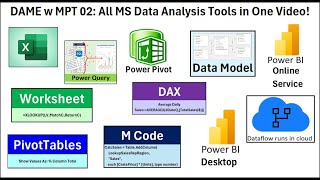
Microsoft Data Analysis Tools: Excel, Power Query, Power BI, Dataflow, DAX and M Code
Comprehensive tutorial on Microsoft data analysis tools, covering Excel, Power Query, Power BI, and more. Learn formulas, data modeling, and visualization techniques for effective data analysis.

Excel Full Course Tutorial - From Basics to Advanced (4+ Hours)
Comprehensive Excel tutorial covering basics to advanced features, including formulas, data analysis, pivot tables, charts, and VBA macros for improved productivity and data management skills.
PivotTables for Quick and Easy Reports - 34 Advanced Techniques
Master PivotTables with 34 advanced techniques for efficient data analysis and reporting. Learn to handle large datasets, create custom calculations, and generate insightful visualizations in Excel.

Excel for Finance and Accounting: Expert Tutorial
Master Excel for finance: NPV, IRR, charts, Pivot Tables. Create income statements, balance sheets, cash flow statements. Practical exercises for real-world financial data analysis and presentation.

Excel Advanced Tutorial - From Named Ranges to VBA
Master advanced Excel techniques: named ranges, XLOOKUP, database functions, macros, and VBA coding. Enhance data analysis, automate tasks, and create efficient spreadsheets for improved productivity.