
MS-Excel
Comprehensive Excel training covering basics to advanced features, including formulas, functions, charts, pivot tables, and keyboard shortcuts for enhanced productivity.

Google Sheets Advanced Tutorial
Master advanced Google Sheets techniques: data sorting, filtering, charts, pivot tables, functions (IF, VLOOKUP, SUMIF), macros, and more. Enhance your spreadsheet skills for efficient data analysis and visualization.

Data Analytics Using Excel
Master Excel for data analytics: clean, analyze, and visualize data using functions, pivot tables, and charts. Gain practical skills for data-driven decision-making and career advancement.

The Ultimate Excel Tutorial - Beginner to Advanced
Comprehensive Excel mastery: from basic formulas to advanced techniques like VBA macros, covering data cleaning, pivot tables, and dynamic arrays for enhanced productivity.

Google Docs Advanced Tutorial
Master advanced Google Docs features: tables, styles, images, charts, collaboration tools, and more. Enhance your document creation skills with practical tutorials on formatting, organizing, and sharing content effectively.

Pivot Table Excel Tutorial
Learn to create, analyze, and visualize data with Excel Pivot Tables. Master data cleaning, formatting, grouping, and advanced features like Pivot Charts and Slicers in this comprehensive tutorial.

Excel Shortcuts for Beginners - Essential Tips to Boost Productivity
Master essential Excel shortcuts to boost productivity and streamline your workflow. Learn navigation, data manipulation, formatting, and advanced features for efficient spreadsheet management.

Pivot Table in Excel
Learn to create, customize, and utilize Pivot Tables in Excel for efficient data summarization and analysis. Master various tools and techniques for powerful data insights.
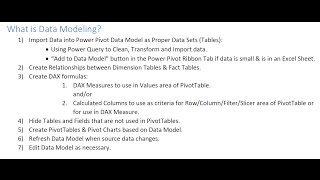
How to Build Data Model and DAX Formulas in Power Pivot
Master data modeling and DAX formulas in Power Pivot for Excel 2016. Learn to create relationships, calculated columns, and measures for powerful data analysis and visualization.

Working with Table Filter for Confluence Add-On
Learn to manage various filter types, create pivot tables and dynamic charts, and export data using the Table Filter add-on for Confluence, enhancing data visualization and analysis.

Excel 2021 - Intro to Data Analysis Tutorial
Learn essential Excel data analysis techniques: tables, conditional formatting, functions, charts, and pivot tables for effective data summarization, visualization, and insight extraction.

Apple Numbers Tutorial
Comprehensive guide to Apple Numbers: from basics to advanced features. Learn data manipulation, formatting, collaboration, and more for creating professional spreadsheets efficiently.

Excel 2019 VBA Full Course Tutorial
Comprehensive 7-hour tutorial on Excel 2019 VBA, covering foundational concepts to advanced techniques. Learn to automate tasks, build custom tools, and enhance Excel functionality through hands-on programming.

Excel 2019 VBA Advanced Tutorial
Advanced VBA techniques for Excel 2019, covering forms, controls, and pivot tables. Learn to create custom interfaces, automate tasks, and manipulate data using Visual Basic programming.
Excel 2021 Pivot Tables Tutorial
Master Excel Pivot Tables to efficiently analyze large datasets, create insightful reports, and design powerful charts. Learn data organization, custom sorting, and advanced functions like XLOOKUP and Power Pivot.

Excel 2021 Expert Tutorial
Master advanced Excel 2021 features: nested functions, database operations, XLOOKUP, UNIQUE, SORT, FILTER, LET, data consolidation, and macros for enhanced productivity and data analysis skills.

Excel 2021 Advanced Tutorial
Master advanced Excel 2021 techniques: data manipulation, pivot tables, formulas, and automation. Enhance efficiency and analytical skills for beginners to experienced users.

Excel 2021 Beginner Tutorial
Comprehensive tutorial covering Excel 2021 basics to advanced features. Learn interface navigation, formulas, data organization, pivot tables, functions, and time-saving automation techniques for increased efficiency.
Excel 2019 - Intro to Data Analysis Tutorial
Learn essential data analysis techniques in Excel 2019, including table formatting, conditional functions, charting, and pivot tables. Gain skills to effectively analyze, summarize, and visualize your data.
Pivot Tables Excel - Detailed Beginners Pivot Table Tutorial
Comprehensive tutorial on creating and manipulating Pivot Tables in Excel, covering data preparation, table creation, field management, aggregation methods, and advanced formatting techniques.

Advanced Pivot Tables Tutorial in Excel
Comprehensive tutorial on advanced Excel pivot tables, covering data import, cleaning, manipulation, and formatting. Ideal for intermediate users seeking to enhance their data analysis skills.