
Photography Masterclass: Client Proofing and Final Image Delivery
Learn client proofing, image processing, and delivery techniques using Lightroom and Photoshop. Master cloud syncing, collaborative workflows, album creation, and advanced editing for professional results.

Adobe MAX Sneaks - Future Technologies in Adobe Research
Explore potential future Adobe technologies with demos by engineers, co-hosted by Chelsea Handler and Paul Trani. Discover innovative features that may shape upcoming Adobe products.
Creative Compositing in Adobe Photoshop - Part 1
Learn advanced Photoshop compositing techniques with Jesús Ramirez. Discover how to realistically combine Adobe Stock images, use filters, masks, and color editing to create stunning visual scenes.

3D Compositing in Photoshop and Dimension Masterclass
Explore 3D modeling in Photoshop and Dimension. Learn to create, import, and render 3D content, manipulate models, materials, and lighting for stunning composites and matched 2D-3D images.

Adobe XD Masterclass: Designing a TV Streaming Interface - Episode 48
Learn advanced Adobe XD techniques for designing TV streaming interfaces, including 3D transforms, masking, state management, and efficient workflows to enhance your UI/UX design skills.
Create Eye-Catching YouTube Thumbnails Like a Pro
Learn to design eye-catching YouTube thumbnails from scratch with pro tips on layouts, backgrounds, cutout effects, and text to make your videos stand out and attract more viewers.

Creating a Click-Worthy Newsletter with Adobe Illustrator - Daily Creative Challenge
Design eye-catching newsletters using Illustrator's type tool and clipping masks. Learn layout techniques, text editing, image framing, and how to create visually appealing content for effective communication.
Creating Brand Identity for a Plant-Based Kitchen - Part 2
Graphic designer Anika Aggarwal demonstrates creating brand identity for a plant-based kitchen, focusing on logo design, typography, color selection, and brand collateral mockups using Adobe Illustrator and Photoshop.
Photoshop Masterclass: Photo Manipulation Techniques
Learn advanced Photoshop techniques for photo manipulation, including color adjustments, distortion tools, image blending, and creating collages. Master essential skills to transform and combine images creatively.

Getting Started with Masking in Photoshop - Techniques and Tools
Learn essential Photoshop masking techniques from expert Jesús Ramirez. Discover tools like Quick Select and Object Selection, refine selections, paint hair, and use Blend If for professional-quality results.
Compositing in Adobe Photoshop - Part 2
Master advanced compositing techniques in Photoshop with Aaron Nace. Learn to cut subjects, scale elements, use filters, add color, create effects, and more for stunning digital compositions.
Compositing in Adobe Photoshop - Part 1
Learn advanced compositing techniques in Photoshop with Aaron Nace. Master custom brushes, layer masks, adjustment layers, and create fantasy-style elements to elevate your digital art and photo manipulation skills.

Timesaving Tricks to Master Selections in Photoshop
Discover timesaving tricks for mastering Photoshop selections. Learn to automate, enhance efficiency, and apply techniques for sky replacement, compositing, and color grading with expert Unmesh Dinda.
Designing Posters and Landscapes in Photoshop - Part 2
Watch artist Magdiel Lopez create stunning portrait posters and surreal landscapes in Adobe Photoshop, demonstrating techniques like gradient use, pen tool cutting, layer styles, and water reflections.
Photoshop Productivity Tips and Tricks - Advanced Techniques
Discover advanced Photoshop techniques to boost productivity, streamline workflows, and unleash creativity with expert tips on layers, smart objects, actions, and customization.
Photoshop Masterclass - Filters and Effects for Mind-Bending Results
Explore mind-bending Photoshop filters and effects with Paul Trani. Learn to create print effects, map images onto textures, bend pixels, and transform visuals in unexpected ways.

Content-Aware Fill in After Effects - Demonstration and Tutorial
Peter McKinnon and Andrew Kramer explore Content-Aware Fill in After Effects, showcasing its power through creative demonstrations and discussing its potential impact on video editing workflows.
360° Photo Editing Workflow - Affinity Photo Tutorial for Virtual Tour Pros
Learn advanced 360° photo editing techniques using Affinity Photo, including RAW development, tripod removal, and seamless editing. Master professional virtual tour creation with various cameras and third-party plugins.
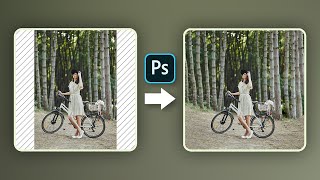
Hate Cropping? - Ways to Expand Photos in Photoshop
Learn three effective techniques to expand photos in Photoshop without cropping, including Content-Aware Fill, Content-Aware Scale, and Mirroring. Perfect for adapting images to various aspect ratios seamlessly.

Difference Between "Save As" and "Export As" in Photoshop
Comprehensive guide comparing "Save As" and "Export As" in Photoshop, covering file formats, scaling options, and multiple layer exports for optimal workflow efficiency.
Ways to Convert an Image to Seamless Pattern - Photoshop Tutorial
Learn three effective techniques to transform images into seamless patterns using Photoshop, including inversion, content-aware fill, and precise cropping for professional-looking results.