How to Draw the Ghostbusters Logo in Adobe Illustrator
Step-by-step guide to recreate the iconic Ghostbusters logo in Adobe Illustrator, covering essential tools and techniques, including a ghostly glow effect for the final touch.

Affinity Designer 2 for Beginners - Essential Tools and Techniques
Master essential Affinity Designer 2 tools and techniques, from basic interface to advanced features like vector brushes, gradients, and masks. Create professional designs with confidence.
Creating the Central Perk Logo in Adobe Illustrator
Learn to recreate the iconic Friends' Central Perk logo in Adobe Illustrator. Master techniques for designing the green plate, ribbon, coffee mug, and text elements using professional fonts and tools.

Best Tools to Convert Image to Vector - Illustrator and Alternatives
Comprehensive guide to image vectorization tools, comparing Illustrator and alternatives. Explores features, results, and best options for converting complex images to vector graphics.
11 Must-Know Tips for Beginners in Adobe Illustrator
Essential tips for Adobe Illustrator beginners: work faster, create shapes, use pathfinder options, apply gradients, distort shapes, and mask images. Boost efficiency and creativity in vector graphics design.
7 Hidden Gems in Adobe Illustrator 2024 - New Features and Improvements
Discover 7 hidden gems in Illustrator 2024, including improved tools, new features, and time-saving shortcuts that enhance your design workflow and productivity.
Transform AI Images to Laser Engravings with Creality Falcon Pro - Step-by-Step Tutorial
Comprehensive guide on converting AI-generated images to laser engravings using Creality Falcon Pro, covering software usage, hardware assembly, and engraving process. Includes free image resources and product testing.

Beginner's Guide to Adobe Animate - Part 1
Learn the basics of Adobe Animate to create stunning web animations. Perfect for beginners, this tutorial walks you through the software's fundamentals, making it easy to understand and start animating.

Kittl - AI-Powered Vector Graphic Design Suite Tutorial
Explore Kittl's AI-powered vector design suite for creating logos, t-shirt designs, and social media graphics. Learn to generate, edit, and convert AI images to vector art for professional-quality designs.

CorelDRAW 2024 Tutorial for Beginners - 11-Minute Guide
Comprehensive 11-minute guide to CorelDRAW 2024, covering essential tools and features for vector graphics creation and bitmap image enhancement.
Affinity Designer vs Adobe Illustrator - 30 Day Experience Review
Explore the pros and cons of Affinity Designer compared to Adobe Illustrator in this insightful review based on 30 days of hands-on experience.

Creating an Inspiration Gallery with Adobe Capture and CC Libraries - Part 1
Discover techniques for building an inspiration library using Adobe Capture and CC Libraries. Learn to collect, organize, and utilize design inspiration for future projects with expert guidance.

Android Development for Beginners - Creating App Inventor Interfaces
Learn to create App Inventor interfaces using vector art, with techniques applicable to regular Android interfaces. Covers setup, Photoshop, margins, stacking, text bars, labels, and more.
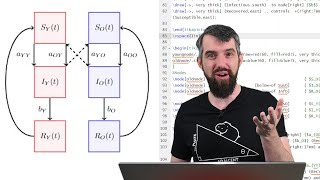
Creating Beautiful Math Graphics with TikZ and LaTeX
Learn to create stunning mathematical diagrams using Tikz in LaTeX. Master lines, shapes, colors, nodes, and advanced techniques for precise and professional-looking graphics in your documents.
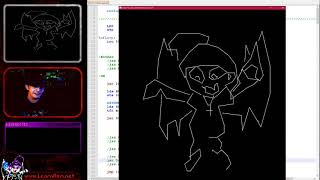
Vector Drawing on the Vectrex - 6809 Assembly Lesson 6
Learn vector drawing techniques for the Vectrex using 6809 assembly, including dots, lines, and text. Explore unique firmware-assisted methods for this distinctive gaming system.
Graphics in Emacs - Rendering, Animation, and Customization
Explore graphics capabilities in Emacs, from image rendering to SVG and animations. Learn practical techniques for creating visual elements and enhancing your Emacs experience.
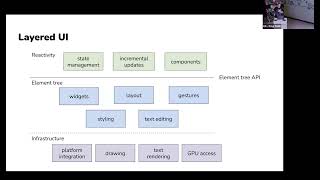
Xilem Vector Graphics: Advanced Rust UI Technology Prototype - Bay Area Rust May 2023
Explore Xilem UI technology: reactive architecture, SVG DOM rendering, GPU rendering with Vello, and advanced Rust features for declarative vector graphics. Open-source collaboration welcome.
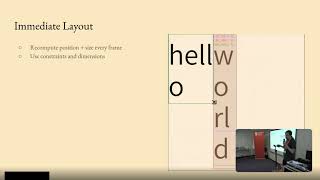
Gio: Cross-Platform GUIs in Go
Explore Gio, a Go-based GUI toolkit for building portable applications across multiple platforms. Learn its unique features, vector rendering approach, and potential impact on Linux desktop development.
Android Vector Drawables - Creating and Using Vector Graphics for Multiple Screens
Learn to create and use Android Vector Drawables with Vector Asset Studio for efficient multi-screen graphics support. Explore generation, implementation, and backward compatibility of vector graphics in Android development.

Material Motion - Blending Design and Animation for Engaging User Experiences
Explore Material Design and motion techniques to create engaging, fluid UI animations that guide users and enhance app experiences through meaningful transitions and gooey effects.

Vector Assets: Improving Android Apps with Scalable Graphics
Learn to create and implement vector assets in Android apps for improved performance and smaller file sizes. Explore formats, capabilities, and animation techniques.