
Background Repair: Using Topaz and Photoshop for Ugly Backgrounds
Learn to repair unsightly backgrounds using Topaz Mask AI and Photoshop. This tutorial covers a complete editing workflow from Lightroom to Photoshop, utilizing various Topaz plugins for optimal results.
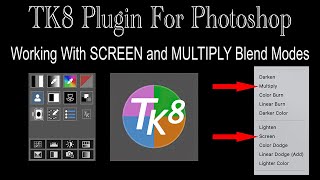
TK8 - Working with Screen and Multiply Blend Modes
Learn to enhance images using SCREEN and MULTIPLY blend modes in Photoshop with the TK8 plugin. Master techniques for lightening shadows, darkening highlights, and creating double vignettes to improve your photo editing skills.
Working with ON1 Photo RAW 2022 - Full RAW Edit and Sky Replacement
Comprehensive tutorial on ON1 Photo RAW 2022, covering full RAW editing, sky replacement, masking tools, and noise reduction using NoNoise AI. Ideal for photographers seeking Lightroom/Photoshop alternatives.
TK Friday - More Tips and Techniques for Photoshop TK8 Plugin
Advanced Photoshop editing techniques using TK8 plugin, featuring a step-by-step tutorial on enhancing a landscape image from Dahner Felsenland, Germany. Includes downloadable practice file for hands-on learning.

Photoshop Blur Gallery: Creating Focus with Creative Bokeh
Learn to enhance image focus using Photoshop's Blur Gallery, mastering Iris Blur and Field Blur techniques to guide viewer attention and create stunning bokeh effects.
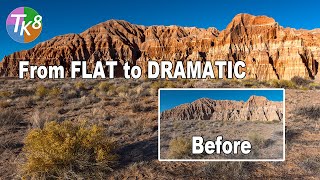
TK8 Plugin for Photoshop - From Flat to Dramatic Image Editing
Transform flat RAW images into dramatic masterpieces using TK8 Plugin for Photoshop. Learn advanced editing techniques to enhance contrast, color, and detail for stunning landscape photography results.
Topaz Texture Effects 2 Tutorial - Adding Creative Textures and Blur
Explore creative texture and blur effects with Topaz Texture Effects 2. Learn techniques for enhancing images, including clarity adjustments, diffusion, masking, and adding vintage elements.
TK8 Plugin for Photoshop: Controlling Light Through Mask Painting
Learn advanced light control techniques in Photoshop using TK8 plugin, including mask painting and frequency separation. Enhance your photo editing skills with practical examples and downloadable practice image.
TK8 Plugin for Photoshop - Edge Masks and Halo Control
Learn advanced edge masking techniques in Photoshop using TK8 plugin to control halos and achieve precise sharpening effects. Enhance your photo editing skills with professional-grade tools and workflows.
Lightroom Classic 11.0.1 - Precise Local Brushing with Intersect Masking
Learn precise local brushing adjustments in Lightroom Classic using intersect masking with luminance range, color range, and sky selection masks for enhanced photo editing capabilities.
Photoshop's Depth Blur Neural Filter - Achieving Realistic Results
Explore improved Photoshop Depth Blur Neural Filter for realistic bokeh effects. Learn tips and tricks to enhance your images with this powerful tool.
TK8 Plugin for Photoshop - Tone Grading: Balancing Shadows, Mid Tones and Highlights
Learn to balance shadows, mid-tones, and highlights using TK8 Color Grading Tool in Photoshop. Discover new techniques for enhancing image tone and color with this powerful plugin.
Transfer Color Grading Between Images Using Photoshop Curves Adjustment Layer
Learn to transfer color grading between images using Photoshop's Curves Adjustment Layer. Master this quick and easy technique to enhance your photo editing skills and achieve consistent color styles.
Photoshop Camera Raw Filter: Natural Color Boost Using Calibration Tool
Learn to enhance image colors naturally using Photoshop's Camera Raw Filter Calibration Tool. Discover techniques for vibrant, balanced results without over-processing.
Understanding Luminosity and Zone Masks via Gradients - TK7 Go Panel
Explore luminosity and zone masks using gradients in Photoshop. Learn to create custom gradient images for experimenting with advanced masking techniques in photo editing.
Luminar AI Portrait Bokeh AI Tutorial - Version 1.4.0
Explore Luminar AI's new Portrait Bokeh AI feature in this tutorial. Learn how to enhance portrait backgrounds and create stunning bokeh effects with AI-powered tools.

Extreme Cropping Tips: Topaz Gigapixel AI, Denoise AI, and Sharpen AI with Lightroom Classic
Discover extreme cropping techniques using Topaz AI tools and Lightroom Classic for enhancing image quality, reducing noise, and sharpening details.
TK7 Panels and Actions - Saturation and Vibrance Masks in LAB Mode for Color Contrast
Explore advanced color editing techniques using TK7 Panels, focusing on Saturation/Vibrance Masks and LAB Mode for enhanced color contrast in your photography workflow.
Topaz Studio 2 - Working with the Precision Detail Filter
Learn to enhance image details using Topaz Studio 2's Precision Detail filter. Master techniques for adding or removing detail locally, improving photo quality and visual impact.
Introduction to Luminosity Masks in Photoshop Using TK7 RapidMask Panel
Discover powerful Photoshop techniques using luminosity masks for tonal balancing and selective editing. Learn to enhance images with the TK7 RapidMask Panel in this hands-on tutorial.
Luminar 4 Sky Replacement Tutorial - Four Different Images
Explore Luminar 4's Sky Replacement Tool with new Atmospheric Haze Slider. Learn to create realistic sky replacements across four diverse images, enhancing your photo editing skills.