Install Custom Linux Desktop Distributions Remotely on LXD Servers - DevOps - Virtualization
Learn to install custom Linux desktop distributions on LXD servers remotely using ISO files, virt-viewer, and SPICE protocol. Explore setup, configuration, and remote access via RDP for efficient development and testing.
Remotely Manage LXD Ubuntu Linux Servers With LXC CLI
Learn to remotely manage LXD Ubuntu Linux servers using LXC CLI. Covers installation, remote commands, server configuration, client authentication, and VM image transfer between servers.
Use LXD Profiles to Manage Virtual Machines on Linux
Learn to efficiently manage virtual machines on Linux using LXD profiles. Explore creation, assignment, and modification of profiles for streamlined VM configuration and group management.
Intro to Virtual Machines With LXD on Linux
Learn to create and manage Linux virtual machines using LXD, an open-source engine. Explore installation, CLI commands, pre-built images, and practical applications for self-hosting, testing, and learning different distributions.
Package Custom Linux Vagrant Boxes on Hyper-V - Open Source Tools
Learn to create, customize, and share Linux Vagrant boxes for Hyper-V using HashiCorp's open-source tool. Covers installation, configuration, packaging, testing, and uploading to Vagrant Cloud.
Configure LXD Virtual Machine Disk Storage on Linux
Learn to manage LXD virtual machine storage on Linux, including creating pools, configuring root filesystems, attaching data disks, and resizing partitions using various storage drivers.
Manage CPU and Memory Resources for LXD Linux VMs
Explore CPU and memory allocation for LXD Linux VMs, including hot-plugging CPUs, memory limitations, and nested virtualization. Learn to use "lxc config" for resource management.
Provision and Manage Ubuntu Virtual Machines with Canonical Multipass
Learn to provision and manage Ubuntu VMs using Canonical's Multipass tool. Explore installation, core functionality, and its interface similarities to Docker while understanding key differences.
How to Reset SSH Host Keys When Deploying Linux Templates in Proxmox
Learn to reset SSH host keys when deploying Linux templates in Proxmox. Enhance server security by creating unique keys for each instance, ensuring proper authentication and preventing potential vulnerabilities.
How to Set Up a Virtualization Server with Proxmox
Learn to set up a Proxmox virtualization server for deploying and managing virtual machines and containers. This guide covers installation, configuration, and key features of this open-source platform.
How to Install and Configure Arch Linux for Penetration Testing
Guía paso a paso para instalar Arch Linux en VirtualBox y configurar los repositorios de BlackArch para realizar pruebas de penetración y usar herramientas de seguridad.

Virtualization - Max Zinkus
Explore virtualization types, strengths, and threats. Learn AWS strategies and gain insights into copy-on-write tradeoffs and mobile device virtualization.
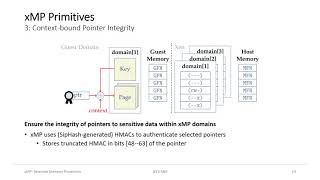
XMP: Selective Memory Protection for Kernel and User Space
Selective memory protection technique for enhanced security in kernel and user space, leveraging virtualization to isolate sensitive data and mitigate data-oriented attacks.
Connecting K8s Pods to Legacy VM Workloads Using Cilium Egress Gateway - Mirantis Labs Tech Talks
Learn how to securely connect Kubernetes pods to legacy VM workloads using Cilium Egress Gateway. Explore limitations of native K8s egress, see a live demo, and understand key benefits of this solution for hybrid environments.
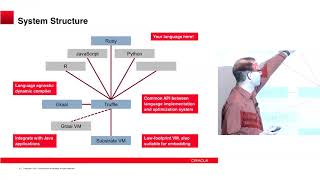
One VM to Rule Them All
Explore GraalVM's capabilities for running multiple programming languages efficiently on a single virtual machine, enhancing performance and interoperability.
Hands-on Introduction to Firecracker - Running and Managing MicroVMs
Comprehensive introduction to Firecracker, covering installation, running microVMs, and key features like snapshots. Ideal for developers interested in lightweight virtualization for secure, efficient container and serverless services.
OpenMediaVault - An Open Source Self Hosted NAS Running on Linux with Docker for Extra Functionality
Learn to install and configure OpenMediaVault, an open-source NAS system, on your own hardware. Explore its user-friendly interface, storage setup, plugins, and Docker integration for enhanced functionality.
Proxmox - A Free, Open Source, Self Hosted Virtual Machine Manager and Full Fledged Linux OS
Explore Proxmox: A powerful, open-source virtualization OS for managing virtual machines. Learn installation, setup, UI navigation, updates, storage management, VM creation, and hardware customization.
Virtual Machine Manager - FreeIPA- Part 1 - Open Source GUI to Manage Virtual Servers and Desktops
Learn to install and use Virtual Machine Manager for managing virtual servers and desktops. Set up Fedora and Ubuntu VMs, explore the interface, and discover remote access capabilities.
VirtIO - A Common Device Framework to Achieve Software Defined Vehicle
Explore VirtIO's role in software-defined vehicles, covering device virtualization, ASIL/security partitioning, and its application in automotive Linux environments.
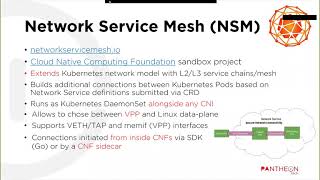
Building CNFs with FD.io VPP and NSM - VPP Traceability in Cloud-Native Deployments
Explore cloud-native network functions using FD.io VPP, NSM, and Ligato.io. Learn CNF deployment, interconnections, and tracing techniques for enhanced visibility in Kubernetes clusters.