CSS Tutorials for Beginners
Comprehensive guide to CSS fundamentals, covering selectors, styling techniques, box model, and practical website building for beginners seeking to enhance their web design skills.
Word 2016 Tutorial
Learn to create professional documents with Word 2016, from basic formatting to advanced features like templates, mail merge, and interactive forms. Master essential skills for modern business communication.
HTML for Beginners
Comprehensive beginner's guide to HTML, covering essential elements from hyperlinks to forms. Learn to create structured web content with practical examples in just one hour.

Microsoft PowerPoint Tutorial - Beginners Level 1
Learn essential PowerPoint skills: creating slides, adding text and images, customizing designs, applying animations, and presenting effectively. Master the basics to create impressive presentations.

Microsoft Word Tutorial - Beginners Level 1
Learn essential Microsoft Word skills: text editing, formatting, styles, lists, images, layout, headers, footers, and more. Perfect for beginners seeking to master basic Word functions.
AutoCAD Text Settings - Text Style - Mtext Editor - Single Line Text - Font Size
Comprehensive guide to AutoCAD text features, covering styles, editing, formatting, and advanced options for both single-line and multiline text. Master text creation and manipulation in AutoCAD.

HTML & CSS Full Course - Learn to Create a Website
Comprehensive guide to HTML and CSS, covering essential web development concepts from basic structure to advanced styling techniques for creating dynamic, visually appealing websites.
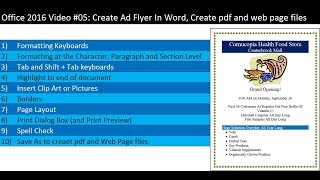
Create Ad Flyer in Word - Create PDF and Web Page Files with Save As
Learn to create professional ad flyers in Word, including formatting, images, borders, and exporting to PDF and web formats. Master essential Word skills for effective document creation.
HTML Tutorial for Beginners - HTML Crash Course
Comprehensive beginner's guide to HTML, covering essential concepts and practical skills for web development, from basic structure to hyperlinks and images.
LaTeX Tutorial for Beginners
Learn to create professional scientific documents with LaTeX, covering basics, mathematics, text formatting, environments, equations, and lists in this comprehensive tutorial.
WordPress Getting Started Tutorials
Learn to create and manage a WordPress site with step-by-step tutorials covering themes, posts, pages, menus, widgets, and plugins for beginners.
HTML Tutorial in English
Learn HTML fundamentals: tags, elements, attributes, formatting, links, images, lists, tables, forms, and basic styling. Hands-on tutorials cover essential concepts for building web pages.

Beginner's Guide to PowerPoint
Comprehensive guide to creating impressive PowerPoint presentations, covering basics to advanced techniques like animations and transitions in just 30 minutes.

Apple Numbers Tutorial
Comprehensive guide to Apple Numbers: from basics to advanced features. Learn data manipulation, formatting, collaboration, and more for creating professional spreadsheets efficiently.

Microsoft Word for Beginners - Training Course in Word 2021/365
Comprehensive training on Microsoft Word 2021/365 basics, covering interface, document creation, formatting, navigation, and essential tools. Includes practical exercises for hands-on learning.

Microsoft PowerPoint for Beginners - Training Course in PowerPoint 2021/365
Comprehensive beginner's guide to PowerPoint 2021/365, covering interface basics, slide design, formatting, and advanced features like shape merging and morph transitions. Includes practical exercises for hands-on learning.

Publisher 2019 for Beginners Tutorial
Learn to create professional publications with Publisher 2019. Master interface navigation, templates, images, text formatting, tables, and more. Gain skills to design posters, newsletters, brochures, and books efficiently.

How to Use PowerPoint 2019
Comprehensive tutorial covering PowerPoint basics to advanced features, including text formatting, graphics insertion, object manipulation, and SmartArt creation for impactful presentations.
Google Slides Beginner Tutorial
Master Google Slides essentials: create engaging presentations with text, images, videos, animations, and more. Learn to format, customize, and share your work effectively for impactful communication.
Word 2021 Beginner Tutorial - Part 1 of 3
Comprehensive tutorial covering essential Word 2021 features for beginners, including text formatting, lists, tables, images, and document layout. Ideal for students and professionals seeking to master basic word processing skills.
PowerPoint 2016 Beginner Tutorial
Learn to create, edit, and enhance presentations using PowerPoint 2016. Master essential features like slide management, text formatting, graphics insertion, transitions, and animations for effective visual communication.