Affinity Photo Crash Course for Web Designers - Photoshop Alternative
Learn Affinity Photo 2, a Photoshop alternative for web designers. Master UI, retouching, color editing, background removal, grading, and layout integration in this concise tutorial.
Body Segmentation with Python and Tensorflow BodyPix - AI Background Removal
Learn to create AI-powered virtual backgrounds using Python, OpenCV, and BodyPix. Segment your body in real-time, remove backgrounds, and apply custom virtual backgrounds without a green screen.
Background Removal - Topaz Mask AI vs Affinity Photo Selection Brush vs Remove.bg
Comparative analysis of background removal tools: Topaz Mask AI, Affinity Photo Selection Brush, and Remove.bg, evaluating their effectiveness and results for various image editing needs.

Remove Backgrounds in Photoshop with Select and Mask
Master pixel-perfect cutouts using Photoshop's Select and Mask Workspace. Learn tools and techniques for precise background removal and image refinement.

Precisely Cut Out Hair Using Color Range in Photoshop
Learn precise hair selection techniques in Photoshop using Color Range. Master background removal, mask refinement, edge fringe elimination, and clean compositing for professional-looking results.

The Easy Background Remover Hidden in Photoshop
Discover a powerful Photoshop tool for effortlessly removing backgrounds, even with complex edges like hair. Learn non-destructive techniques for precise image editing.
Voice Commands in Photoshop - Hell Yeah
Explore voice command software for Photoshop and other applications, enabling hands-free control for tasks like skin softening and background removal.
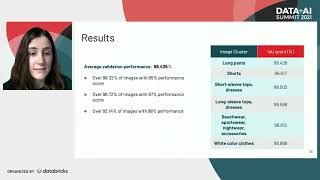
Automated Background Removal Using PyTorch - Wehkamp's Image Processing Pipeline
Discover an automated pipeline for efficient background removal in product images using PyTorch and machine learning, enhancing visual experiences for e-commerce customers.

ControlNet Union ProMax, Pixart Sigma 900M, and New ComfyUI Features
Explore new ComfyUI features: ControlNet Union ProMax, Pixart Sigma 900M, improved background removal, and more. Enhance your AI image generation capabilities with these free tools.

How to Remove and Replace Photo Backgrounds in Canva - Step-by-Step Tutorial
Master the art of removing image backgrounds in Canva with step-by-step guidance on uploading, editing, adding new backgrounds, adjusting dimensions, applying filters, and exporting your finished designs.

Best Canva Photo Editing Tips and Tricks - 10 Essential Techniques
Master essential photo editing techniques in Canva, from background removal and color isolation to creating mockups and animated effects. Learn 10 powerful tricks to enhance your images and design skills.
How to Remove Background from Any Image Using Python and CLI
Learn to remove image backgrounds using Python and CLI tools. Master essential libraries, image manipulation techniques, and efficient background removal for single or multiple images.

What's New in Wolfram Video: Advanced Editing and Generation Capabilities
Explore latest Wolfram Language video functions: subtitle support, editing, and programmatic generation. Discover advanced capabilities for video manipulation and creation.
Mastering Photoshop AI Background Replacement Techniques
Master advanced background replacement techniques using Photoshop's Firefly AI tools to transform and enhance your digital images with professional precision.