Главная
Study mode:
on
1
Introduction
2
Create a New Document
3
Add Solid Color Adjustment Layer
4
Reset Default Colors
5
Change Font
6
Change Text Size
7
Adjust Text Space
8
Change Typeface
9
Change Text Color
10
Change Text Type
11
Change Fill Color
12
Stretch Bounding Box
13
Merge Layers
14
Merge Layers Again
15
Change Character
16
Change Tracking
17
Move Tool
18
Second Layer
19
Adjusting Line Spacing
20
Align Left Edges
21
Align Bottom Edges
22
Align Paragraph
23
Periods
24
Cafe Latte
25
Price List
26
Lets
27
More Periods
28
Reorder Layers
29
Duplicate Layers
30
Free Transform
31
Apply Changes
32
Rename Folder
33
Add Nitro Coffee
34
Update Prices
35
Mix Prices
36
Line Up
37
Add Periods
38
Add Text Layer
39
Free Transform Layer
40
Drinks Layer
41
Transform Layer
42
Paragraph
43
Character Panel
44
Folder Name
45
Update Menu Items
46
Update Price List
47
Add Text
48
Add Line Breaks
49
Add Price List
50
Change Folder Visibility
51
Type Tools
52
Type Baked Goods
53
Add Prices
54
Photoshop Issues
55
Removing Periods
56
Moving Prices
57
Aligning Prices
58
Selecting Price and Items
59
Changing the Characters
60
Duplicating the Divider
61
Aligning the Divider
62
Moving the Sections
63
Fixing a Mistake
64
Adding Drinks Text
65
Adding Dividers
66
Adding the Last Section
67
Changing the Colors
68
Changing the Section
69
Changing the Text
70
Changing Prices
71
Removing Period Key
72
Changing Section Header
73
Adjusting Kerning
74
Adding Blended Juices
75
Deleting Periods
76
Adding New Layer
77
Changing Color
78
Adjusting Size
79
Finalizing Titles
80
Outro
Description:
Learn to design an eye-catching coffee shop and bakery menu in Photoshop with this comprehensive tutorial. Master essential techniques for creating a visually appealing layout, including font selection, color adjustment, text formatting, and layer management. Follow step-by-step instructions to craft a professional menu design, incorporating elements such as price lists, section headers, and dividers. Explore advanced features like Free Transform, Character Panel adjustments, and kerning to refine your design. Gain practical skills in organizing menu items, aligning prices, and creating a cohesive visual hierarchy. Perfect for aspiring designers and small business owners looking to enhance their marketing materials.
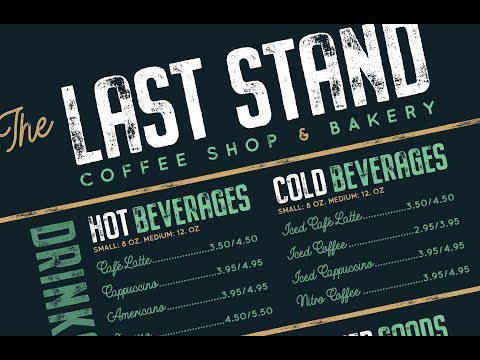
How to Create a Coffee Shop & Bakery Menu Design in Photoshop

Design Cuts
Add to list